AI Assistant Chat for Optimizely, a new way of working
The Epicweb AI-Assistant integrates AI Assistant Chat directly into Optimizely CMS 12 and 13, assisting editors in analyzing, managing, translating, and optimizing content for SEO and AEO without leaving the CMS.

Key Strengths
- Deep CMS Integration
- Context-Aware: Automatically understands the current page, block, or asset being edited
- Content Attachment: Attach multiple content items to provide full context to the AI
- Seamless Workflow: Access AI assistance without leaving the editing experience
- Smart Instructions System
- Dynamic Instructions: Instruction sets can be defined, combined, and adjusted per assistant, content type, or workflow
- Instructions are automatically applied based on page type, language, role, or scenario
- Active instructions are visible and understandable, ensuring predictable and controlled AI behavior
- Instructions can be managed in code, configuration, or external repositories
- Persistent Conversation Management
- Session Storage: Messages persist across page refreshes or language context switching
- Context Preservation: Attached content and context maintained throughout session
- Advanced and Customizable Tool System
- Function Calling: AI can execute actions through registered tools, full CRUD operations
- Tooling Lazy loading: AI can load tool packs when needed only
- MCP Support: Model Context Protocol integration for extensibility
- @ Mentions: Autocomplete tool discovery (type @ to see available tools)
- Custom Tools: Easy registration of project-specific tools
- Out of the box tools: Working with content, updating, language handling, versioning, saving and publishing.
- Built for editors with simplified implementation for developers.
The solution is fully customizable using native Optimizely CMS development. All functionality is configured through established CMS patterns, with business logic implemented in backend code. The AI operates directly within the CMS context, without requiring additional modules or complex external SaaS systems. It supports both DXP environments and on-prem installations, making it particularly well suited for organizations with a strong, traditional CMS foundation.
Concrete values:
- Context-aware AI that understands page type, structure, and metadata
- Specialized assistants for SEO, translation, accessibility, and tone
- Built-in support for SEO, AEO, and WCAG directly in the editing flow
- Controlled updates that always occur with the editor's approval
- Ability to work all the way from analysis to publication via chat
- Customizable per organization, content type, and workflow
- Works in both DXP and on-prem environments for CMS 12 and 13
Video Example - Manage Content
The Video Explained
The AI assistant chat is a context aware AI assistant fully integrated into Optimizely CMS 12 and 13. It is designed to support editors directly within their daily workflow. The assistant understands the current page, block, or asset, preserves conversation context across interactions, and provides intelligent support for content creation, editing, translation, and optimization.
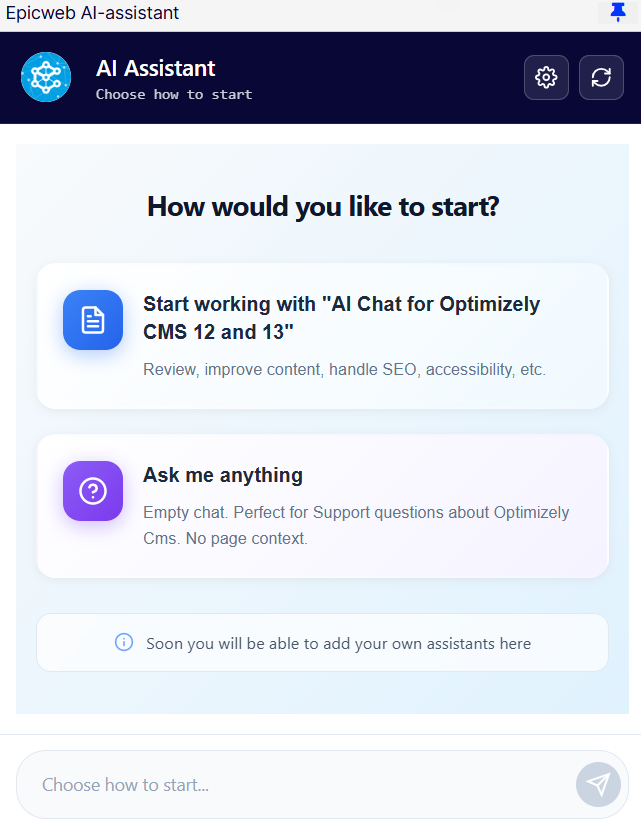
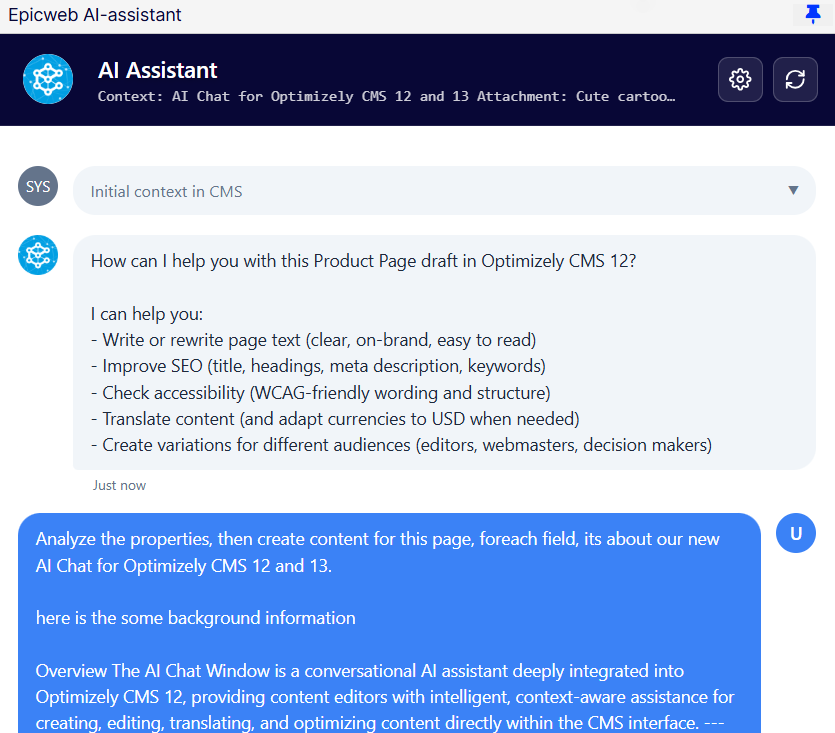
In this demo, we provide the AI with an outline of what we want the page to contain. The AI then analyzes all fields and generates the content accordingly, fully adapted to the characteristics of the page template.
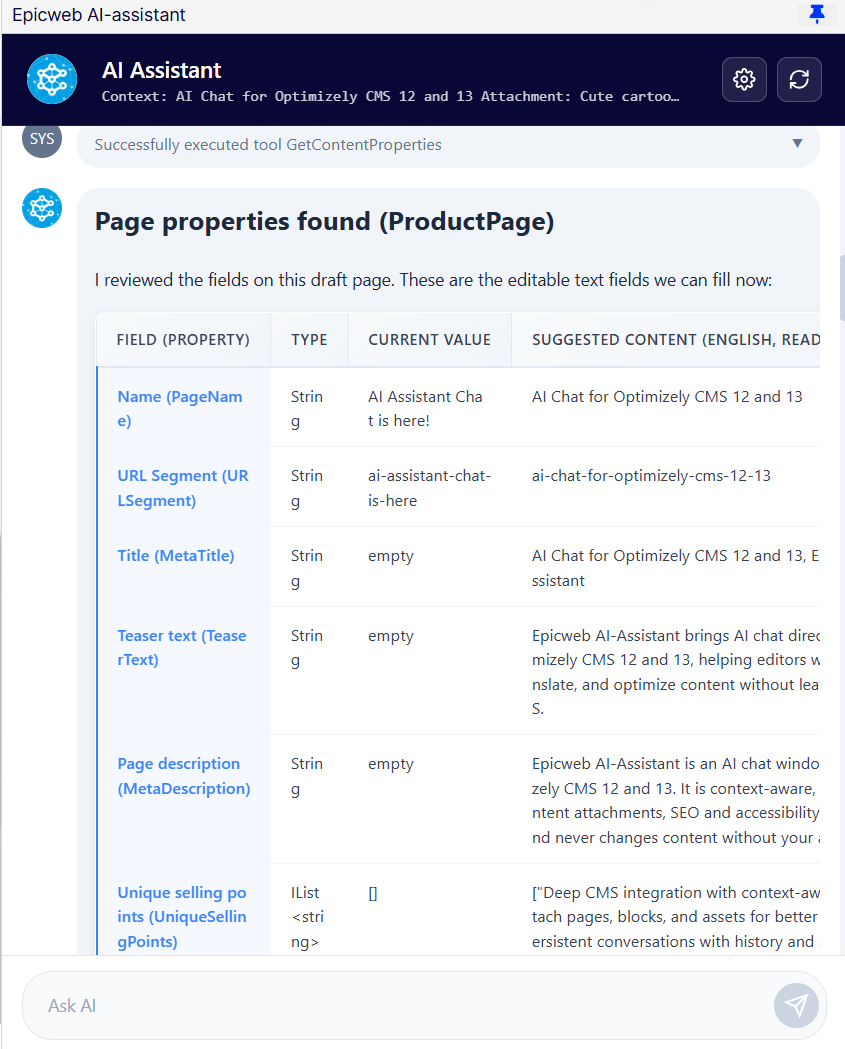
We can then see how it suggests content for all fields, including SEO fields and a frequently asked question section, but also a simplified text.
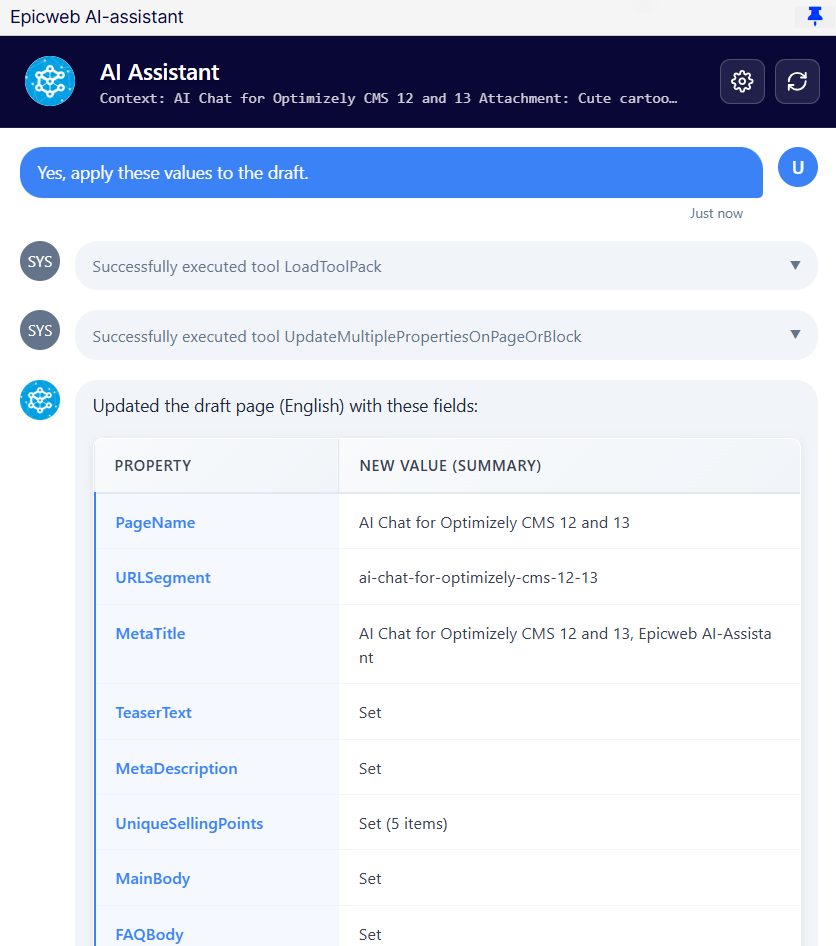
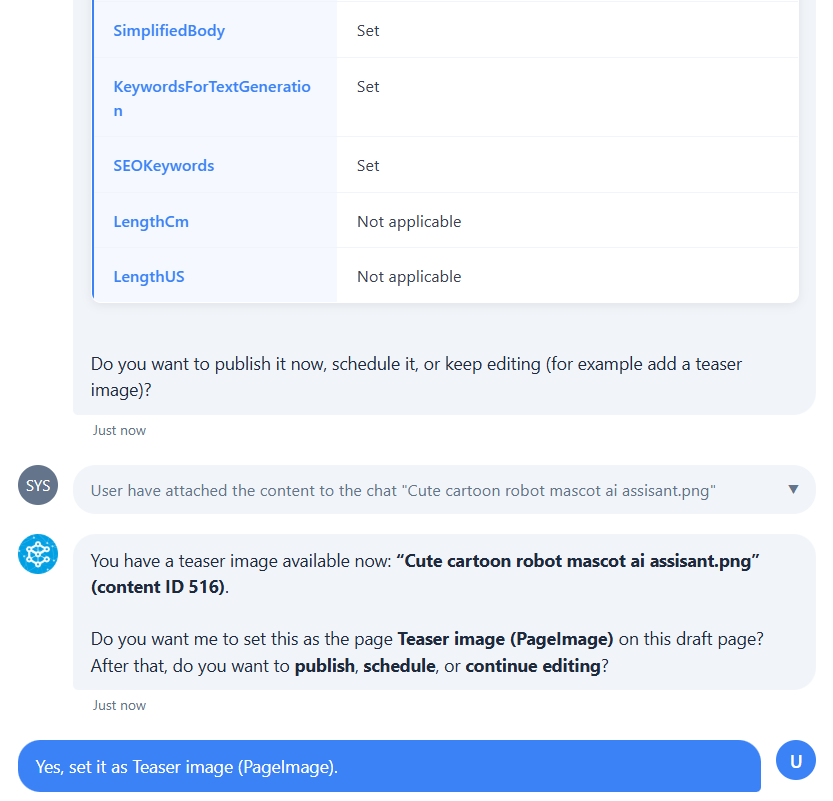
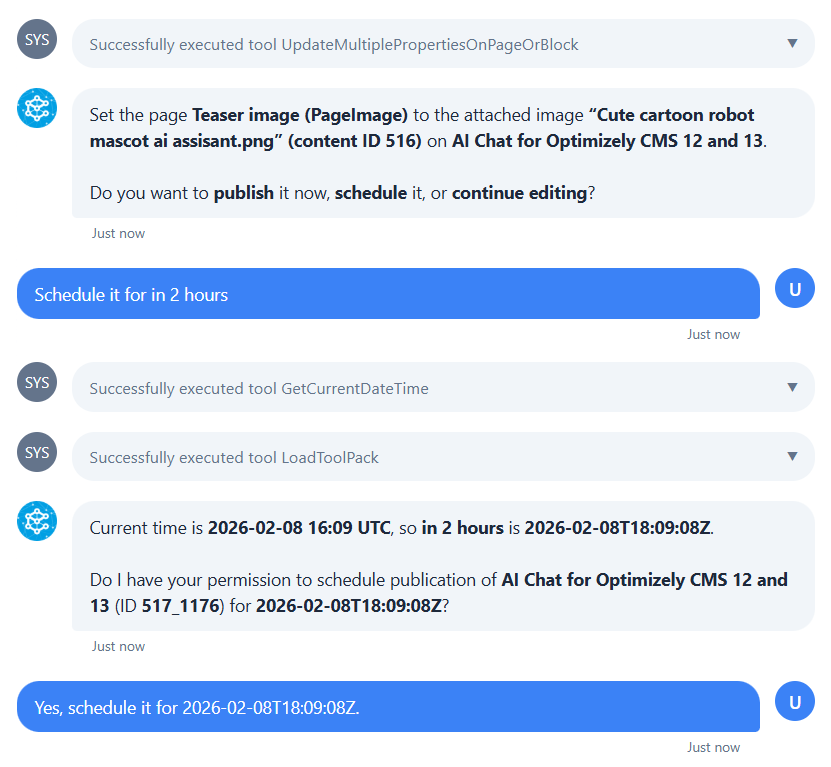
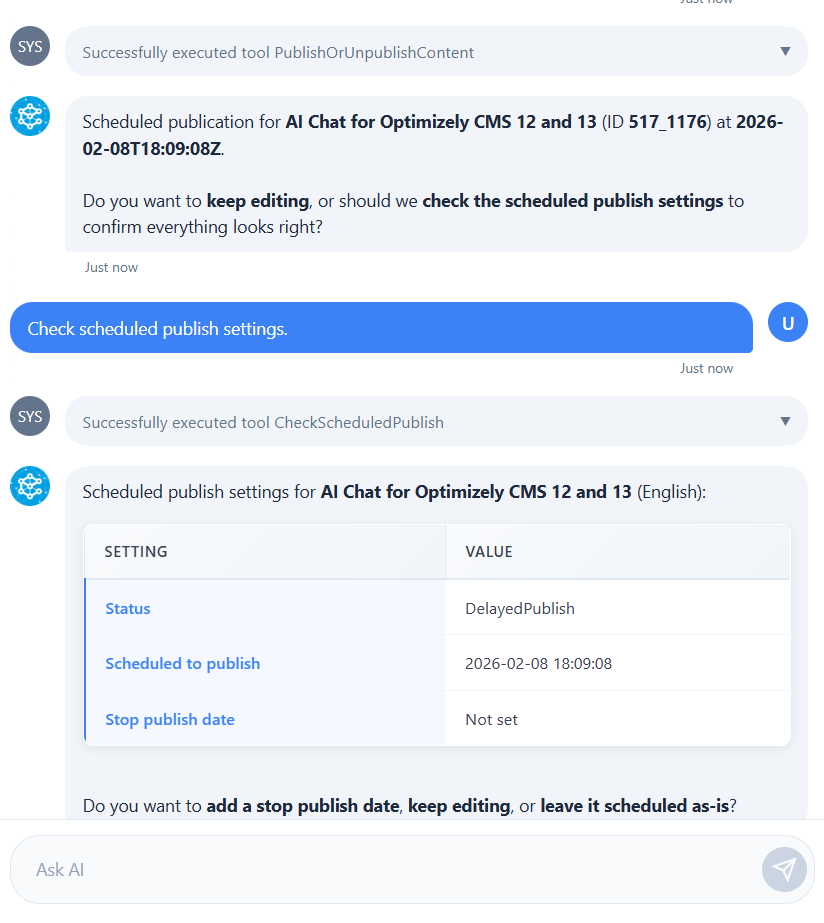
The AI is equipped with tools that it can load and use as needed. These tools can be easily created and tailored to your specific implementation and workflows.
The interface fully supports drag and drop for all Optimizely content items, including images, blocks, and pages. Let us attach an image to this page.
As you can see, the entire process is fast, intuitive, and remarkably simple. We encourage you to explore our other videos and guides to discover even more possibilities. Learn how to translate content, compare versions and language variants, and retrieve content from external systems, all directly within the CMS. Working with an AI assistant chat as a copilot represents a completely new way of creating content. It significantly increases productivity, but more importantly, it raises the overall quality, consistency, and confidence of everything you publish.
FAQ
What is the AI Chat Window in Optimizely CMS?
It is an in-CMS chat experience powered by Epicweb AI-Assistant. It helps editors write, revise, translate, and optimize content using the page or block you are working on as context.
Does it understand the page I am editing?
Yes. It is context-aware and can also use attached pages, blocks, or assets so answers match your site content.
Will it change my content automatically?
No. It can suggest changes, but it will ask for confirmation before applying updates.
Can we extend it with our own tools?
Yes. You can register custom tools and integrate with MCP to add project-specific actions.
Does it support SEO and accessibility?
Yes. It can suggest clearer headings, better meta descriptions, keyword ideas, and more accessible wording aligned with WCAG guidance.
Can it help me find consistency between language versions?
Yes, with natural language, you can ask to compare the content between languages and get an answer if any information differs.
Book a meeting to get started!
We offer a one-hour introduction meeting about our AI Assistant for Optimizely CMS 12. (Swedish or English)
The AI Assistant: This is what you get
Feature-Rich for Enhanced Editorial Efficiency
Epicweb's AI Assistant comes with an impressive array of features:
-
Text Suggestions and Alternatives: Enhance your writing with AI-generated phrasing and alternative variations.
-
Multilingual Translation: Seamlessly translate your text into multiple languages while preserving formatting and style to reach a diverse audience.
-
SEO, AEO and GEO: Generate optimization content for search engines and AI search.
-
Prompt Pro Assistance: It saves time and helps you get more out of your ideas, instantly.
-
Image AltText Analyzer: Advanced AI capabilities to analyze images and automatically populate media object properties
-
Image Generation: Create relevant and engaging images that complement your content.
-
Image Transformer: Take any image, enhance it, and add new elements with AI-powered creativity. Transform the way you interact with images.
-
New Text Generation: Generate fresh content that keeps your audience engaged.
-
Text Summarization: Quickly condense long texts into concise summaries, saving time and maintaining essence, perfect for SEO descriptions.
-
HTML Formatting: The AI-Assistant offers a range of formatting capabilities within the Rich Text Editor. WCAG Compatible.
-
Spell-Checking: Ensure your content is error-free and professionally polished.
-
Tone Adjustment and Consistency: Adapt your content’s tone to suit its purpose and maintain a consistent brand voice.
-
Keyword Extraction: Identify and extract key terms from your text for SEO optimization.
-
Custom Prompts with ChatGPT: Leverage the power of ChatGPT to run your own prompts for unique content creation.
-
Custom Shortcut Prompts: Add your own shortcuts for frequently used commands, connect tools and enhancing productivity.
-
Inline ChatGPT Help: Use ChatGPT or Google GEMINI directly within the platform for instant assistance.
-
Tools for AI: Connect your C# Function Calling or MCP tools directly to the AI Assistant, enabling custom integrations.
-
RAG (Retrieval-Augmented Generation): Connect your own knowledge base for AI responses powered by your organization’s internal data.
Streamlined Integration into Optimizely
The AI Assistant is seamlessly integrated into every field within the Optimizely CMS and Commerce platform, ensuring that these powerful features are accessible right where you need them, in the editor mode.
Getting Started with The Epicweb AI-Assistant:
To get started with the free evaluation, simply fill in the form in our website to get started and download the addon to your Optimizely CMS and Customizable Commerce platform from the Optimizely Nuget feed.
Follow our beginner-friendly guide or dive deep with our comprehensive documentation.
Installation is quick and easy, allowing you to start harnessing the power of AI assistance in no time.
Book a meeting to get started!
We offer a one-hour introduction meeting about our AI Assistant for Optimizely CMS 12. (Swedish or English)
Note: This blog post has been enhanced with the help of the AI-Assistant for Optimizely.
About the Author